gavicore.ui Description
The gavicore.ui package contains the code to generate widgets and panels
- from plain OpenAPI Schema instances of type Schema, and
- from input instances within a process, i.e., InputDescription instances contained in a ProcessDescription instance.
The design of the framework's core is neutral with respect to the target UI
library. An implementation that generates UIs for the Panel library
is located in the gavicore.ui.panel package. It is used by
the Cuiman cuiman.gui.Client to generate UIs for the
OpenAPI schemas of the inputs of a selected process in Jupyter Notebooks.
The customization of the GUI generation in Cuiman is described
here.
Programming Model
The framework entry point to generate UI from an OpenAPI schema is the FieldGenerator class that is configured with FieldFactoryRegistry populated with one or more FieldFactory implementations.
The FieldFactoryBase class eases implementing factories for custom field types.
The following snipped explains the programming model:
from gavicore.models import Schema
from gavicore.ui import FieldGenerator, FieldMeta, FieldFactoryRegistry

# what is needed:
# --- factories that generate fields from metadata (required)
from mylib import MyFieldFactory1, MyFieldFactory2
# --- observer for value changes in the generated UI tree (optional)
from mylib import MyViewModelObserver
# --- top-level field metadata, e.g. from OpenAPI Schema (required)
my_schema = Schema(**{...})
my_field_meta = FieldMeta.from_schema(my_schema)
# --- an initial value for the UI (optional)
my_value = {}

# Generator setup:
registry = FieldFactoryRegistry()
registry.register(MyFieldFactory1())
registry.register(MyFieldFactory2())
generator = FieldGenerator(registry)
# Generator usage:
field = generator.generate_field(my_field_meta)

# Then:
# --- populate UI fields
field.view_model.value = my_value
# --- observe value changes in UI fields
my_observer = MyViewModelObserver()
field.view_model.watch(my_observer)
# --- and do something to render field.view
Framework Overview
The following class diagram provides an overview of the classes and
interfaces in gavicore.ui:
---
config:
    class:
        hideEmptyMembersBox: true
    theme: default
---
classDiagram
    direction LR

    Field ..> FieldMeta
    Field --> View
    Field --> gavicore.ui.vm.ViewModel
    FieldBase --|> Field

    gavicore.ui.vm.ViewModel --> FieldMeta

    class Field {
        meta: FieldMeta
        view_model: ViewModel*
        view: Any*
    }


    class FieldBase {
        meta: FieldMeta
        view_model: ViewModel
        view: Any
        _bind()*
    }

    class FieldMeta {
        name: str
        schema: Schema
        widget: str
        layout: FieldLayout
        order: int
        advanced: bool
        title: str
        description: str

        from_schema(schema)$ FieldMeta
        from_input_description(input)$ FieldMeta
        from_input_descriptions(inputs)$ FieldMeta
    }
---
config:
    class:
        hideEmptyMembersBox: true
    theme: default
---
classDiagram
    direction TB

    FieldContext --> FieldMeta
    FieldFactory ..> Field: create
    FieldFactory ..> FieldContext: use
    FieldFactory ..> FieldContext: use
    FieldFactoryBase --|> FieldFactory
    FieldGenerator ..> FieldContext : create
    FieldGenerator --> FieldFactoryRegistry
    FieldFactoryRegistry *--> FieldFactory

    class FieldFactory {
        get_score(meta: FieldMeta)* int
        create_field(ctx: FieldContext)* Field
    }

    class FieldFactoryBase {
        get_score(meta: FieldMeta) int
        get_boolean_score(meta: FieldMeta)* int
        get_integer_score(meta: FieldMeta)* int
        get_..._score(meta: FieldMeta)* int

        create_field(ctx: FieldContext) Field
        create_boolean_field(ctx: FieldContext)* Field
        create_integer_field(ctx: FieldContext)* Field
        create_..._field(ctx: FieldContext)* Field
    }

    class FieldContext {
        meta: FieldMeta
        vm: ViewModelFactory

        create_property_fields(obj_meta) dict
        create_item_field(array_meta) Field
        create_child_field(child_meta) Field
    }

    class FieldFactoryRegistry {
        register(factory) Callable
        lookup(meta: FieldMeta) FieldFactory|None
    }

    class FieldGenerator {
        generate_field(meta: FieldMeta, initial_value) Field
    }
A ViewModel is used by a Field to hold the value currently being edited by the field's view - a widget or any viewable that is rendered and managed by the actual UI-library used. View model changes are propagated into the view and vice-versa. Since fields may form a field tree, changes observed in child view model are propagated to their parents.
---
config:
    class:
        hideEmptyMembersBox: true
    theme: default
---
classDiagram
    direction BT

    ViewModel *--> ViewModelObserver
    ViewModel --> gavicore.ui.FieldMeta
    ViewModelObserver ..> ViewModelChangeEvent : consume
    ViewModel ..> ViewModelChangeEvent : emit
    ViewModelChangeEvent --|> ViewModelChangeEvent

    class ViewModel {
        meta: FieldMeta
        value: Any
        watch(observer: Callable, ...) Callable
        dispose()
        _get_value()* Any
        _set_value(value: Any)*
    }

    class ViewModelChangeEvent {
        source: ViewModel
        causes: ViewModelChangeEvent[]
    }

    PrimitiveViewModel --|> ViewModel
    CompositeViewModel --|> ViewModel
    ArrayViewModel --|> CompositeViewModel
    ObjectViewModel --|> CompositeViewModel
Panel Implementation
The framework's view model API is defined in gavicore.ui.vm.
Basic Usage
The package gavicore.ui.panel defines a
PanelField
and a PanelFieldFactory
for generating UIs from OpenAPI Schema targeting the Panel
UI-library. For example, you can generate a UI from a given OpenAPI schema
using
from gavicore.ui.panel import PanelField

my_field = PanelField.from_schema(my_schema)
The my_field.view object will then contain the Panel UI and
the my_field.view_model can be used to get, set, and observe the edited value.
The view is a widget-like component (it is likely a panel.widgets.WidgetBase)
that can be used as part of a larger UI developed
with Panel.
The PanelFieldFactoryBase class eases supporting custom field types targeting the Panel library.
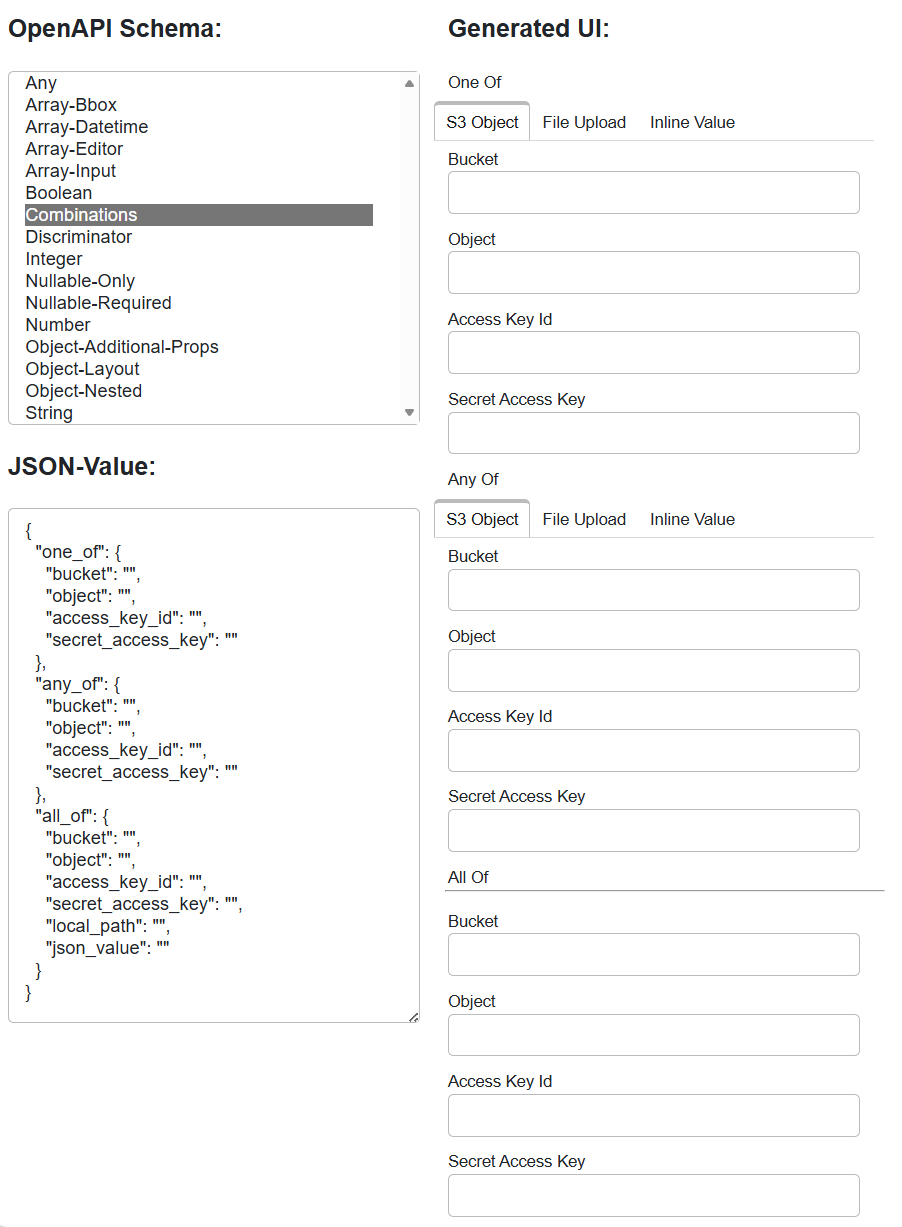
schema2ui Tool
Developers of and contributors to gavicore.ui should regulary use the provided
schema2ui tool. It opens a browser tab where you can select an OpenAPI schema from
a list and generate the UIs for it. This way you can see how the framework renders
the supported OpenAPI schemas, which are provided in the
gavicore/tests/ui/schemas
folder. The schemas are also used to perform unit-level smoke tests
with PanelField.from_schema().
The tool can be run from the Eozilla's project root folder with
pixi run schema2ui
and brings a simple app that looks like this: